您现在的位置是:网站首页> 编程资料编程资料
asp.net微信开发(自定义会话管理)_实用技巧_
 2023-05-24
318人已围观
2023-05-24
318人已围观
简介 asp.net微信开发(自定义会话管理)_实用技巧_
和微信用户的沟通少不了,总觉得看起来微信官网后台管理中的会话回复消息有点呆板,所以我这里就自定义了一个会话管理功能,最终效果图如下:


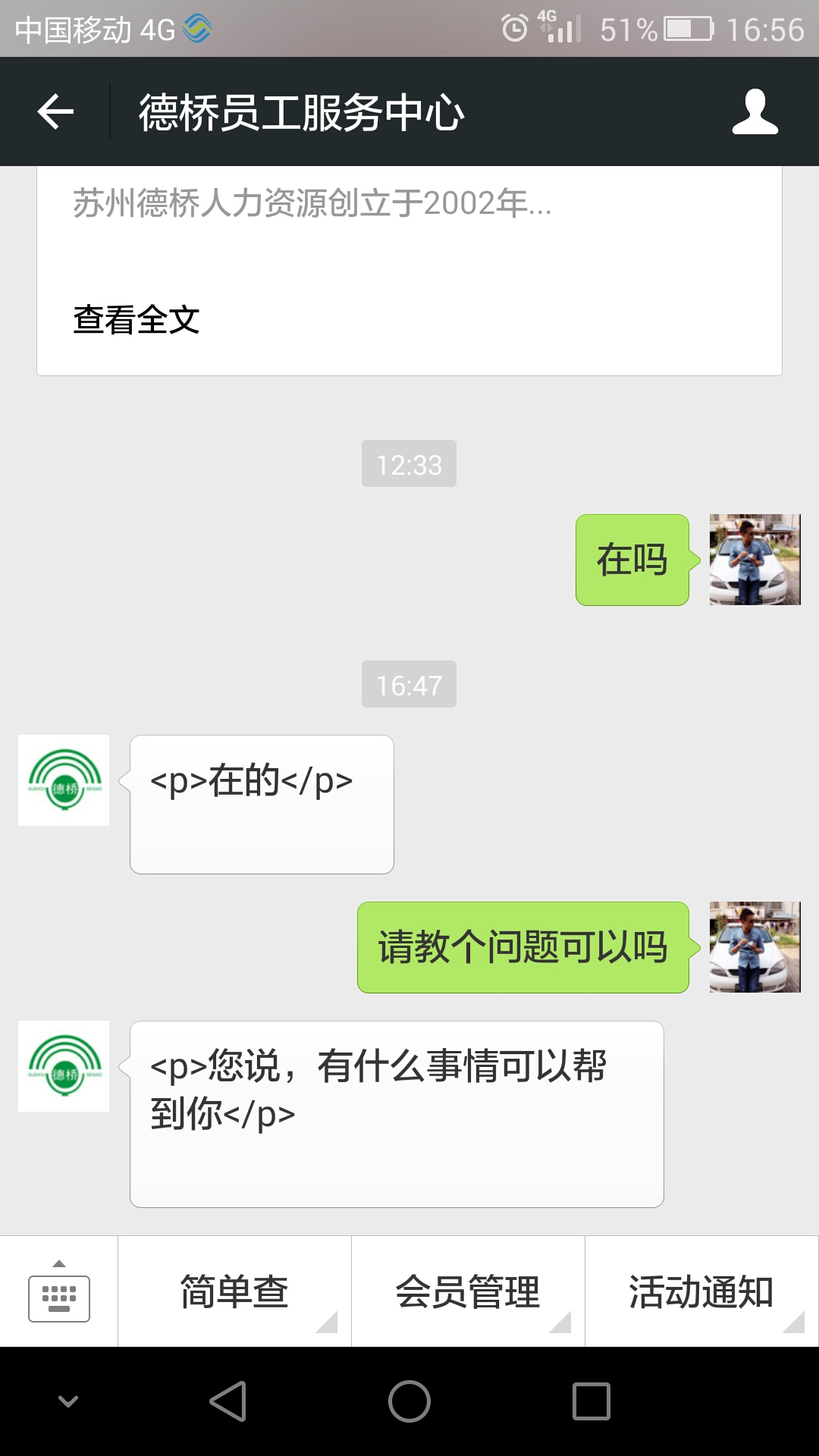
因为我试使用富文本文件CKEDITOR来进行编写,你看到稳中可能会有
字段,后台获取数据内容时,替换为空字符即可:如下 string txtcontent = this.txtMessage.Value.ToString().Replace("", ""); StringBuilder sb = new StringBuilder(); sb.Append(txtcontent.Replace("
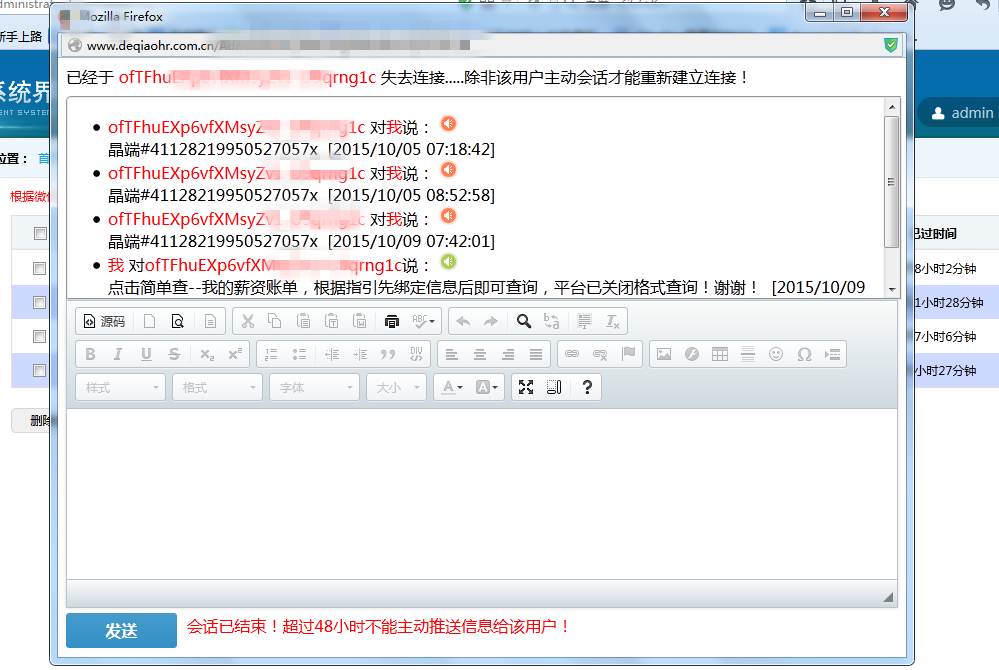
\r\n", "")); 在我个人理解,做会话管理,无非就是将用户对话信息(用户发过来的数据,发给用户的数据)存入数据库,根据用户的数据时间和回复用户数据的时间来和当天系统的时间做对比,如果大于多少分钟或者多少个小时就不可以再主动和用户对话,就算我这里是根据微信官网48小时来进行限制的,超过48小时禁用控件,如下图:
废话少说,上代码:需要用到的两个类,数据库也要创建和类相同的名字(至少我试这么做的)
////// 微信会话记录类,用户存储会话记录列表 /// public class WeixinKeFuInfo { public int UId { get; set; }//编号 public string UserOpenId { get; set; }//用户的OpenID public string UserContent { get; set; }//用户内容 public string CreaterDate { get; set; }//创建时间 } ////// 与微信用户会话的消息记录类 /// public class WxMessageInfo { public int msgId { get; set; }//消息ID public string FromUser { get; set; }//发送用户 public string ToUser { get; set; }//接收用户 public string Content { get; set; }//发送内容 public string FaSongDate { get; set; }//发送时间 public string UId { get; set; }//会话用户的UId,微信会话记录类外键 } ////// 发送文本。。。。。。。。。。。。。还记得这个方法吗?就是根据用户发送过来的消息类型进行判断后,如果是文本就回复发送此方法内的内容 /// /// private void SendTextCase(RequestXML requestXML) { WeixinKeFuService wkfs = new WeixinKeFuService();//自己写的服务类 //根据openId查询数据库会话记录是否存在 WeixinKeFuInfo wkfinfoinfo = wkfs.GetWeixinKeFuInfoByOpenId(requestXML.FromUserName.ToString()); if (wkfinfoinfo != null) { //如果存在直接保存消息记录 WxMessageService wms = new WxMessageService(); WxMessageInfo wminfo = new WxMessageInfo(); wminfo.FromUser = requestXML.FromUserName.ToString(); wminfo.ToUser = "我"; wminfo.Content = requestXML.Content.ToString(); wminfo.FaSongDate = System.DateTime.Now.ToString("yyyy/MM/dd HH:mm:ss"); wminfo.UId = wkfinfoinfo.UId.ToString(); wms.AddWxMessageInfo(wminfo); } else { //如果不存在新建会话记录 WeixinKeFuInfo wkfinfo = new WeixinKeFuInfo(); wkfinfo.UserOpenId = requestXML.FromUserName.ToString(); wkfinfo.UserContent = requestXML.Content.ToString(); wkfinfo.CreaterDate = System.DateTime.Now.ToString("yyyy/MM/dd HH:mm:ss"); wkfs.AddWeixinKeFuInfo(wkfinfo); string responseContent = FormatTextXML(requestXML.FromUserName, requestXML.ToUserName, "正在接入.请稍候....."); HttpContext.Current.Response.ContentType = "text/xml"; HttpContext.Current.Response.ContentEncoding = Encoding.UTF8; HttpContext.Current.Response.Write(responseContent); HttpContext.Current.Response.End(); } }
以上代码实现了数据库的插入,那么取出来,显示的页面,核心代码:WeiXinSessionList.aspx,前台代码如下:
<%@ Page Language="C#" AutoEventWireup="true" CodeBehind="WeiXinSessionList.aspx.cs" Inherits="DQWebSite.Administrator.WeiXinSessionList" %>提示: 本文由神整理自网络,如有侵权请联系本站删除!
本站声明:
1、本站所有资源均来源于互联网,不保证100%完整、不提供任何技术支持;
2、本站所发布的文章以及附件仅限用于学习和研究目的;不得将用于商业或者非法用途;否则由此产生的法律后果,本站概不负责!
点击排行
本栏推荐